Understanding Twain
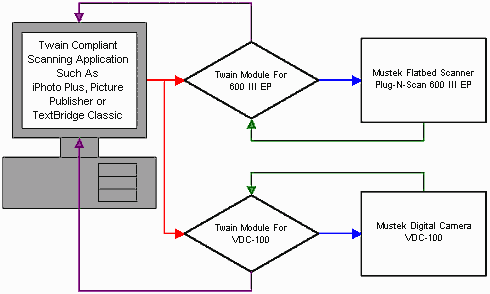
(C) Mustek, 1997 All rights reserved. This document may not be reprinted,reproduced or distributed in anyway without the express written permissionof Mustek. Twain is a computer industry standard which specifies how image acquisitiondevices such as Scanners, Digital Cameras and other devices transfer datato software applications. Twain allows software applications to work withimage acquisition devices without knowing anything about the device itself.If a device is Twain Compliant and a software application is Twain Compliant,the two should work together regardless of whether or not the softwarewas bundled with the image acquisition device when it was purchased. Before the advent of Windows and Twain, users and developers faced thedifficult dilemma of drivers. For every hardware device owned, you wouldneed a driver for every software program you owned. When there were onlythree different printers and three different programs, only nine driverswere needed. But as the number of printers, programs and other devicesgrew, so did the number of drivers needed. There are currently over 200 different printer types, over 20 imageediting packages, and over 20 different scanners. If every image editingprogram was to work with every scanner and every printer there would be80,000 different drivers to make everything work with everything. Obviouslythe market couldn’t survive like this, either some items would go unsupportedor the industry had to find a better way. Enter Windows. Windows changed the way people looked at peripherals. All printers areessentially the same, varying only in details and implementation. WhatWindows did was to develop generic print services. So any program thatwanted to print would just print to the generic device and let Windowshandle the specifics. Twain is the standard that does the same for scanners. All scannersbasically produce the same type of information, varying only in detailand implementation. The Twain specification was written by a group of eighthardware and software companies. The acronym means Toolkit Without An InterestingName. Twain driver, Twain interface and Twain module are all synonyms fora software module that allows image editing, optical character recognition,desktop publishing and fax software to deal with the scanner in a genericway. Users don’t need to determine if ,"XYZ" program supportsscanner "ABC" before they buy it, instead they just look to seeif both support Twain. Through Twain and Windows, the number of required drivers drops from80,000 to a mere 220… now that’s progress! All Mustek scanners support Twain. Some popular Windows programs thatsupport Twain are: Adobe Photoshop, Corel Photo Paint, WinFax Pro, PageMaker,Picture Publisher, iPhoto Plus, Fractal Design Painter, Microsoft Publisher,Wordlinx OCR and Text Bridge OCR. The diagram below shows how Twain modules work:
1. A Twain Compliant application such as iPhotoPlus calls the Twain module up when you click on the acquire command onthe file menu. 2. The Twain module takes control of the scannerand allows the user to set the Scan Mode and Resolution. 3. When the Scan button is clicked, the scannerbegins transmitting the image data back to the Twain Module. 4. The Twain module transfers the image data backto the program that Twain was acquired from. It is possible to attach more than one Twain Compliant image acquisitiondevice to a computer at the same time as shown in the above diagram. Eachof the devices will have it’s own separate Twain module. This makes itnecessary for Twain Compliant software applications to provide a meansfor the end user to select which Twain device to use during a session.Most Twain compliant applications have a function on the File Menu whichallows selection of the Twain Source or Acquire Device. The Twain Sourcethat is currently selected will be the one called up when the acquire commandis activated. |