Text Bridge Classic AndMicrosoft Word 97
Microsoft made changes in Word 97 which render TextBridge Classic’sInstant Access OCR feature inoperable from Word 97. Xerox has written apatch called Instant Access 97 that will remedy this compatibility problem.The patch is available from the TextBridgeWeb Page. When you download the patch, be sure to print a copy of the installationinstructions. IMPORTANT NOTE: When I installedInstant Access 97 here at Mustek, the instructions that came with it didnot work completely. Microsoft Word was already listed as a registeredapplication with Instant Access 97 the first time I ran Instant Access97. I had to DELETE Microsoft Word from the list of Registered Applicationsand then ADD it back before TextBridge OCR would appear on the MicrosoftWord File Menu. If you choose not to download the patch, below are instructions forusing TextBridge Classic as a standalone program to perform OCR. Once thetext has been saved as a file, you can then open and edit it with Word97. 1. If Instant Access OCR is on your Taskbar, right click it and chooseclose. 2. Click the Windows 95 Start button, select Programs then highlightthe TextBridge Classic group. Click TextBridge Classic to open the program. 3. A Textbridge window like the one below will open.
4. Click the 5. Click the Go button which will bring up the F/B Scanner dialogbox (Twain driver). 6. Set the Scan Mode to Lineart, the Resolution to 300 dpi and clickPrescan. 7. When the Preview comes up, set the Crop Frame so it surrounds allof the text you wish to recognize (Don’t crop too close). 8. Click the Scan button. After the page is scanned, the F/B Scannerdialog box will close automatically and return to TextBridge Classic. 9. Click the 10. Click the Go button. TextBridge will now recognize the text on thispage. Afterward, you will be asked if you have additional pages to scan.If there are more pages, click Continue, otherwise click End. 11. TextBridge will prompt you for a filename. The default file typeis *.rtf which Word 97 can read. 12. Type in the file name and click Save. If you wish to save the filein a different folder than the default of "C:Program FilesTextBridgeClassictiffs*.rtf", navigate to the other f older before clickingthe Save button. 13. Your text document can now be opened and edited with Word 97. |
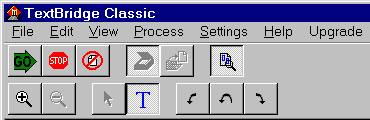
 buttonso it looks like this:
  TextBridgeis now set to the Preview mode.
 buttonthen use the mouse to draw a box closely around your text in order to cropout the margin of your page. This will result in a higher accuracy rate.