Description: |
| | | The flatbed scanner will pre-scanbut the computer locks up during scanning. |
Cause: |
| | | This is caused by 16-bit memorymanagement utilities that load from the Config.sys file when you boot yourcomputer. Windows 95 is a 32-bit operating system that does not need the16-bit memory managers. |
Solution: |
| | | Disable the 16-bit memory managersoftware. |
| | | |
| | | Steps to disable16-bit memory managersin Windows 95. |
| | | 1. | Click the START button and select RUN. |
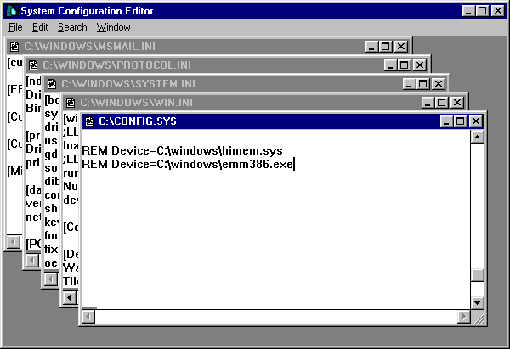
| | | 2. | Type SYSEDIT and click OK. This opens theSystem Configuration Editor, which is a simple word processor. Each ofyour system files will be open in it’s own window. Refer to the diagramfor the remaining steps. |
| | | |  |
| | | 3. | Close the Autoexec.bat file without makingany changes to it. |
| | | 4. | In the Config.sys file, locate a line containingthe following: DEVICE=C:WINDOWSHIMEM.SYS |
| | | 5. | Type the word REM and one space in front ofthis line as below: REM DEVICE=C:WINDOWSHIMEM.SYS |
| | | 6. | Still in the Config.sys file, locate a linecontaining the following: DEVICE=C:WINDOWSEMM386.EXE |
| | | 7. | Type the word REM and one space in front ofthis line as below: REM DEVICE=C:WINDOWSEMM386.EXE |
| | | 8. | Click on the FILE Menu and click SAVE, thenclose the Config.sys file. |
| Your flatbed scanner will work properly now on your NEC ReadyComputer. |
|