 | Document # 6521 |
        |
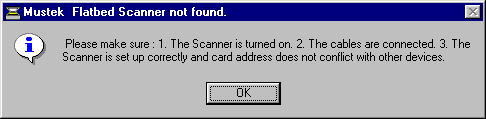
123 Error Message
This version of the 123 error message usually appears when attemptingto scan. |
| Cause #1. You may not have waited for the scanhead to returnto the starting position after pre-scanning. Solution #1. Wait for the green LED light on the front of thescanner to stop blinking between pre-scanning and scanning. Cause #2. You may be having a software conflict. Solution #2. Shutdown all programs which are running in the background. It may be necessary to reboot the computer in order to clean up thesystem memory prior to re-attempting the scan. You also may wish to bootWindows 95 in Safe Mode to check for software conflicts. Cause #3. Your interface card may have failed. Solution #3. To test the integrity of your interface card youmust re-install the Twain driver. Shutdown and reboot your computer. After rebooting, re-install the TwainData Source. If your scanner came with a Scanner Solutions CD, re-installthe CD. If the Scantest works properly during re-installation, your cardis okay. If you get the other 123 message during re-installation, yourcard may have failed. Return to the previous page and go through the troubleshootingsteps for the other version of the 123 message. |
| Mustek and the Mustek logo are trademarks and registered trademarksof Mustek, Incorporated. Any use without the express written permissionof Mustek is forbidden. Other company and product names may be trademarksor registered trademarks. |